HCPSS Grade Calculator: Your Howard County Weighted Grade
GradesCalculate a weighted course grade with editable categories.
| Category | Score | Max | Weight % | Remove |
|---|---|---|---|---|
The HCPSS grade calculator computes your weighted course grade using Howard County’s official A–E scale — enter each assignment or marking-period score and its weight, and it returns your exact percentage, letter grade, and the quality points that feed your GPA under HCPSS Policy 8020.
How the HCPSS Grade Calculator Works
The HCPSS grade calculator turns your individual assignment scores into a single course grade using the same weighted grade logic that Howard County teachers apply in their gradebooks. Instead of averaging every score equally, it multiplies each category — tests, quizzes, classwork, projects — by the percentage weight your teacher assigned, then adds those weighted pieces together. The result is the percentage and letter grade you would actually earn under the Howard County Public School System (HCPSS), Maryland grading policy.
Because HCPSS courses combine four quarter grades with a mid-term and final exam into one year-end grade, the calculator is most useful in two ways: first, to project a marking-period grade from the assignments in your Canvas or Synergy gradebook, and second, to estimate the final grade you need across quarters to land the letter you want.

Inputs: each score (or category average) as a percentage, plus the weight (%) that category or marking period carries. Outputs: a weighted overall percentage, the matching HCPSS letter grade (A–E), and the quality points that feed your GPA. Weights across all categories should total 100%. Enter a target grade to see the score you still need on remaining work.
The Official HCPSS Grading Scale
Howard County uses a straight A–E letter scale with no plus or minus modifiers. This scale is defined in HCPSS Policy 8020, Grading and Reporting: Middle and High School. Each letter grade maps to a fixed percentage band and a set of quality points on the 4.0 GPA scale. Note that HCPSS uses “E” rather than “F” for a failing grade, and an E earns no high school credit.
One detail worth knowing: HCPSS gradebooks round fractional percentages to the nearest whole number before assigning a letter. If the tenths digit is 5 or higher, it rounds up. So an 89.5% rounds to 90% — an A — while an 89.49% stays at 89% — a B.
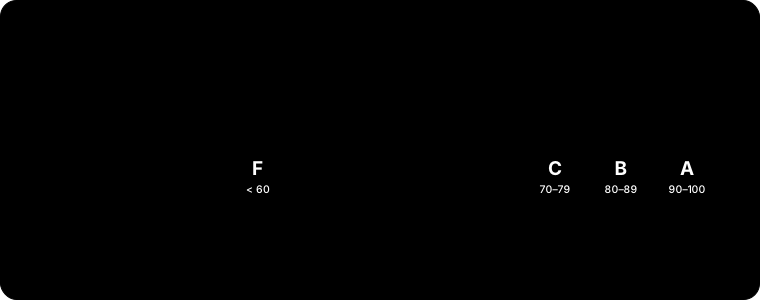
| Letter Grade | Percentage Range | Quality Points (Unweighted) | Meaning |
|---|---|---|---|
| A | 90–100% | 4.0 | Excellent |
| B | 80–89% | 3.0 | Good |
| C | 70–79% | 2.0 | Satisfactory |
| D | 60–69% | 1.0 | Minimum passing |
| E | 59% or lower | 0.0 | Failing — no credit |

How Weighted Grades Work — With a Worked Example
A weighted grade reflects that not all assignments count equally. Suppose your English teacher weights the marking period as Tests 40%, Quizzes 25%, Homework 20%, and Participation 15%. You earn an 88 on tests, 92 on quizzes, 100 on homework, and 85 on participation.
Multiply each average by its weight and add: (88 × 0.40) + (92 × 0.25) + (100 × 0.20) + (85 × 0.15) = 35.2 + 23.0 + 20.0 + 12.75 = 90.95%. Because the tenths digit is 5 or more, HCPSS rounds that to 91% — a solid A. Notice that a perfect homework score alone couldn’t save a weak test average, since tests carry the most weight.
HCPSS then combines your four quarters and exams into a year-end grade. For a full-credit high school course, each quarter counts 20% and the mid-term and final exam each count 10%. Policy 8020 does this with quality points: multiply each quarter’s points by 2, add the two exam points, and divide by 10. Four grades of A(4), B(3), A(4), B(3) with a midterm B(3) and final A(4) give (8 + 6 + 8 + 6 + 3 + 4) ÷ 10 = 3.5, which converts to a final A.

| Quality-Point Average | Final Letter Grade |
|---|---|
| 3.50 – 4.00 | A |
| 2.50 – 3.49 | B |
| 1.50 – 2.49 | C |
| 0.75 – 1.49 | D |
| Below 0.75 | E (no credit) |
How to Use the HCPSS Grade Calculator
Pull your assignment scores from Canvas (the HCPSS learning platform) or the Synergy/StudentVUE gradebook, then follow these steps.

- Confirm your teacher’s category weights from the course syllabus or Canvas — for example Tests 40%, Quizzes 30%, Homework 30%. Make sure they total 100%.
- Enter each category’s average score as a percentage, then enter its weight in the matching field.
- Add a row for every category or marking period you want to include. For a year-end estimate, enter each quarter (20%) and both exams (10% each).
- Read the weighted percentage the calculator returns, then match it to the HCPSS scale — remember the round-at-.5 rule.
- To plan ahead, enter your target letter grade and the weights of the work you have left; the tool shows the minimum score you still need.
- Cross-check the final letter against your official grade in Synergy, since only the teacher’s posted grade of record is official.
Honors, GT, and AP Weighting — The HCPSS GPA Bonus
HCPSS reports two GPAs, and colleges see both: an unweighted GPA on the pure 4.0 scale, and a weighted GPA that rewards course rigor. Under the Policy 8020 implementation procedures, an Advanced Placement (AP) or Gifted and Talented (G/T) course adds +1.0 quality point per credit, and an Honors course adds +0.5 quality point — but only when you earn an A, B, or C. Slip to a D or E and the bonus disappears; you keep only the base points.
So an A in an AP class is worth 5.0 weighted quality points, an A in an Honors class is worth 4.5, and an A in a regular class is worth 4.0. Your cumulative GPA multiplies each course’s quality points by its credits, sums them, and divides by total credits. This is why one challenging AP course can lift a weighted GPA above 4.0.
| Grade | Regular | Honors (+0.5) | AP / G/T (+1.0) |
|---|---|---|---|
| A | 4.0 | 4.5 | 5.0 |
| B | 3.0 | 3.5 | 4.0 |
| C | 2.0 | 2.5 | 3.0 |
| D | 1.0 | 1.0 | 1.0 |
| E | 0.0 | 0.0 | 0.0 |
- Verify category weights add up to exactly 100%
- Enter scores as percentages, not raw points, unless the calculator converts them
- Include the mid-term (10%) and final exam (10%) for year-end projections
- Apply the .5 rounding rule before reading your letter grade
- Use +1.0 for AP/GT and +0.5 for Honors only on A, B, or C grades
- Treat Synergy’s posted grade as the official one
Related Grade & GPA Calculators
Once you know your weighted grade, explore more grade & curve calculators to plan the rest of your semester. If a teacher adjusts scores, the Grade Curve Calculator and the Grading Bell Curve Calculator show how a curve reshapes your result. To model your transcript, use the GPA Calculator or browse all GPA calculators. AP students can estimate exam outcomes with our AP score calculators, and the study guides cover grading strategy in more depth.
Frequently Asked Questions
What is the HCPSS grading scale?
HCPSS uses a five-letter scale: A is 90–100%, B is 80–89%, C is 70–79%, D is 60–69%, and E is 59% or lower. There are no plus or minus grades, and E (not F) marks a failing grade that earns no high school credit. This is defined in HCPSS Policy 8020.
Is this a Howard County (HCPSS) grade calculator?
Yes — this is a Howard County grade calculator for the Howard County Public School System (HCPSS). Whether you searched “howard county grade calculator,” “hcpss grade calculator,” or “grade calculator hcpss,” it computes your weighted class grade and letter grade using the official HCPSS grading scale.
How does HCPSS calculate final course grades?
For a full-credit high school course, each of the four quarters counts 20% and the mid-term and final exams each count 10%. Policy 8020 does this with quality points: multiply each quarter’s points by 2, add the two exam points, and divide by 10. Semester (0.5-credit) courses multiply each quarter by 2, add the final exam points, and divide by 5 — so each quarter is 40% and the final 20%.
How much do AP and Honors courses add to my HCPSS GPA?
AP and Gifted and Talented (G/T) courses add +1.0 quality point per credit, and Honors courses add +0.5, but only for grades of A, B, or C. So an A in AP is worth 5.0 weighted points, an A in Honors is 4.5, and an A in a regular class is 4.0. A D or E receives no bonus.
Does HCPSS round grades up?
Yes. HCPSS gradebooks round fractional percentages to the nearest whole number. If the tenths digit is 5 or higher it rounds up, and if it is below 5 it rounds down. That means an 89.5% becomes 90% (an A), while an 89.49% stays 89% (a B).
What is the difference between weighted and unweighted GPA at HCPSS?
Unweighted GPA uses the pure 4.0 scale where an A is always 4.0 regardless of course level. Weighted GPA adds the +1.0 (AP/G/T) and +0.5 (Honors) rigor bonuses for grades of A, B, or C. HCPSS reports both, and most colleges review both numbers.
Where do I find my HCPSS grades?
Marking-period and assignment grades appear in Canvas, the HCPSS learning platform, and the official grade of record is posted in the Synergy/StudentVUE gradebook. Use the assignment scores from Canvas as inputs, but treat the posted Synergy grade as the authoritative one.
Is there a plus or minus grade in HCPSS?
No. Howard County uses only A, B, C, D, and E. There is no A+, A-, B+, or similar modifier, so every A is treated as a full 4.0 (or the weighted equivalent) for GPA purposes.
Why do Biology and American Government use a different formula?
For Biology, Biology G/T, American Government, and American Government Honors, HCPSS incorporates the required Maryland state end-of-course assessment into the final grade. In those courses each of the four quarters and the state assessment each count 20% of the final grade rather than using the standard midterm-and-final weighting.